
- Request the dealer to create a login in Lotpop's name. This can be made in anyone's name that is apart of the Lotpop team
- The permissions need to have the ability to create reports. If this function is not available in our login, we will not be able to create the necessary reports for leads to feed into LotWalk.
- Go to Settings > Users > Reporting Settings> Find our username > Check 'Allow Access' for the following
- Manage Version Sharin
- Custom Reporting
- CRM Reports and My Dashboard
- Check 'Allow Edit' for the following:
- Custom Reporting
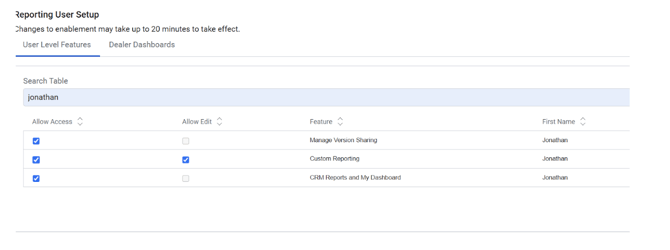
- Go to Settings > Users > Reporting Settings> Find our username > Check 'Allow Access' for the following
- Enter Grasshopper number for Bridge ID verification, 913-534-1044
- Send login username and password to Michaella or Brett to put in Keeper
- Contacts:
- Direct representative for dealer